<!DOCTYPE HTML>
<html>
<head>
<meta charset="UTF-8">
<link rel="dns-prefetch" href="//apps.bdimg.com">
<meta http-equiv="X-UA-Compatible" content="IE=11,IE=10,IE=9,IE=8">
<meta name="viewport" content="width=device-width, initial-scale=1.0, user-scalable=0, minimum-scale=1.0, maximum-scale=1.0">
<meta name="apple-mobile-web-app-title" content="兔八哥爱分享-软件下载平台-绿色软件下载-破解软件免费下载">
<meta http-equiv="Cache-Control" content="no-siteapp">
<title>PS磨皮插件 Portraiture 3 v3.5.7中文汉化版X64支持PS2022 | 兔八哥爱分享-软件下载平台-绿色软件下载-破解软件免费下载-兔八哥爱分享-软件下载平台-绿色软件下载-破解软件免费下载</title>

		<!-- All in One SEO 4.0.18 -->
		<link rel="canonical" href="http://www.rjafx.com/archives/3356" />
		<meta property="og:site_name" content="兔八哥爱分享-软件下载平台-绿色软件下载-破解软件免费下载 | 一个专注热门软件的分享" />
		<meta property="og:type" content="article" />
		<meta property="og:title" content="PS磨皮插件 Portraiture 3 v3.5.7中文汉化版X64支持PS2022 | 兔八哥爱分享-软件下载平台-绿色软件下载-破解软件免费下载" />
		<meta property="og:url" content="http://www.rjafx.com/archives/3356" />
		<meta property="article:published_time" content="2022-01-23T14:07:02Z" />
		<meta property="article:modified_time" content="2022-01-23T14:07:06Z" />
		<meta property="twitter:card" content="summary" />
		<meta property="twitter:domain" content="www.rjafx.com" />
		<meta property="twitter:title" content="PS磨皮插件 Portraiture 3 v3.5.7中文汉化版X64支持PS2022 | 兔八哥爱分享-软件下载平台-绿色软件下载-破解软件免费下载" />
		<script type="application/ld+json" class="aioseo-schema">
			{"@context":"https:\/\/schema.org","@graph":[{"@type":"WebSite","@id":"http:\/\/www.rjafx.com\/#website","url":"http:\/\/www.rjafx.com\/","name":"\u5154\u516b\u54e5\u7231\u5206\u4eab-\u8f6f\u4ef6\u4e0b\u8f7d\u5e73\u53f0-\u7eff\u8272\u8f6f\u4ef6\u4e0b\u8f7d-\u7834\u89e3\u8f6f\u4ef6\u514d\u8d39\u4e0b\u8f7d","description":"\u4e00\u4e2a\u4e13\u6ce8\u70ed\u95e8\u8f6f\u4ef6\u7684\u5206\u4eab","publisher":{"@id":"http:\/\/www.rjafx.com\/#organization"}},{"@type":"Organization","@id":"http:\/\/www.rjafx.com\/#organization","name":"\u5154\u516b\u54e5\u7231\u5206\u4eab-\u8f6f\u4ef6\u4e0b\u8f7d\u5e73\u53f0-\u7eff\u8272\u8f6f\u4ef6\u4e0b\u8f7d-\u7834\u89e3\u8f6f\u4ef6\u514d\u8d39\u4e0b\u8f7d","url":"http:\/\/www.rjafx.com\/"},{"@type":"BreadcrumbList","@id":"http:\/\/www.rjafx.com\/archives\/3356#breadcrumblist","itemListElement":[{"@type":"ListItem","@id":"http:\/\/www.rjafx.com\/#listItem","position":"1","item":{"@id":"http:\/\/www.rjafx.com\/#item","name":"\u4e3b\u9801","description":"\u4e00\u4e2a\u4e13\u6ce8\u70ed\u95e8\u8f6f\u4ef6\u7684\u5206\u4eab","url":"http:\/\/www.rjafx.com\/"}}]},{"@type":"Person","@id":"http:\/\/www.rjafx.com\/archives\/author\/zlsofthost#author","url":"http:\/\/www.rjafx.com\/archives\/author\/zlsofthost","name":"\u5154\u516b\u54e5\u7231\u5206\u4eab","image":{"@type":"ImageObject","@id":"http:\/\/www.rjafx.com\/archives\/3356#authorImage","url":"http:\/\/0.gravatar.com\/avatar\/c7c5a5655795bd7601a9030972e7110f?s=96&r=g","width":"96","height":"96","caption":"\u5154\u516b\u54e5\u7231\u5206\u4eab"}},{"@type":"WebPage","@id":"http:\/\/www.rjafx.com\/archives\/3356#webpage","url":"http:\/\/www.rjafx.com\/archives\/3356","name":"PS\u78e8\u76ae\u63d2\u4ef6 Portraiture 3 v3.5.7\u4e2d\u6587\u6c49\u5316\u7248X64\u652f\u6301PS2022 | \u5154\u516b\u54e5\u7231\u5206\u4eab-\u8f6f\u4ef6\u4e0b\u8f7d\u5e73\u53f0-\u7eff\u8272\u8f6f\u4ef6\u4e0b\u8f7d-\u7834\u89e3\u8f6f\u4ef6\u514d\u8d39\u4e0b\u8f7d","inLanguage":"zh-CN","isPartOf":{"@id":"http:\/\/www.rjafx.com\/#website"},"breadcrumb":{"@id":"http:\/\/www.rjafx.com\/archives\/3356#breadcrumblist"},"author":"http:\/\/www.rjafx.com\/archives\/3356#author","creator":"http:\/\/www.rjafx.com\/archives\/3356#author","datePublished":"2022-01-23T14:07:02+08:00","dateModified":"2022-01-23T14:07:06+08:00"},{"@type":"Article","@id":"http:\/\/www.rjafx.com\/archives\/3356#article","name":"PS\u78e8\u76ae\u63d2\u4ef6 Portraiture 3 v3.5.7\u4e2d\u6587\u6c49\u5316\u7248X64\u652f\u6301PS2022 | \u5154\u516b\u54e5\u7231\u5206\u4eab-\u8f6f\u4ef6\u4e0b\u8f7d\u5e73\u53f0-\u7eff\u8272\u8f6f\u4ef6\u4e0b\u8f7d-\u7834\u89e3\u8f6f\u4ef6\u514d\u8d39\u4e0b\u8f7d","headline":"PS\u78e8\u76ae\u63d2\u4ef6 Portraiture 3 v3.5.7\u4e2d\u6587\u6c49\u5316\u7248X64\u652f\u6301PS2022","author":{"@id":"http:\/\/www.rjafx.com\/archives\/author\/zlsofthost#author"},"publisher":{"@id":"http:\/\/www.rjafx.com\/#organization"},"datePublished":"2022-01-23T14:07:02+08:00","dateModified":"2022-01-23T14:07:06+08:00","commentCount":"3","articleSection":"Windows, \u8f6f\u4ef6","mainEntityOfPage":{"@id":"http:\/\/www.rjafx.com\/archives\/3356#webpage"},"isPartOf":{"@id":"http:\/\/www.rjafx.com\/archives\/3356#webpage"},"image":{"@type":"ImageObject","@id":"http:\/\/www.rjafx.com\/#articleImage","url":"http:\/\/www.rjafx.com\/wp-content\/uploads\/2022\/01\/ded2679f54abf16.jpg","width":"648","height":"565","caption":"PS\u78e8\u76ae\u63d2\u4ef6 Portraiture 3 v3.5.7"}}]}
		</script>
		<!-- All in One SEO -->

<link rel='dns-prefetch' href='//apps.bdimg.com' />
<link rel='dns-prefetch' href='//s.w.org' />
<link rel='stylesheet' id='wp-block-library-css'  href='http://www.rjafx.com/wp-includes/css/dist/block-library/style.min.css?ver=5.4.12' type='text/css' media='all' />
<link rel='stylesheet' id='guten-post-layout-font-icons-css'  href='http://www.rjafx.com/wp-content/plugins/guten-post-layout/src/assets/css/font-icons.css?ver=1610544106' type='text/css' media='all' />
<link rel='stylesheet' id='_bootstrap-css'  href='http://www.rjafx.com/wp-content/themes/dux6.4/css/bootstrap.min.css?ver=6.4' type='text/css' media='all' />
<link rel='stylesheet' id='_fontawesome-css'  href='http://www.rjafx.com/wp-content/themes/dux6.4/css/font-awesome.min.css?ver=6.4' type='text/css' media='all' />
<link rel='stylesheet' id='_main-css'  href='http://www.rjafx.com/wp-content/themes/dux6.4/css/main.css?ver=6.4' type='text/css' media='all' />
<script type='text/javascript' src='//apps.bdimg.com/libs/jquery/1.9.1/jquery.min.js?ver=6.4'></script>
<link rel='https://api.w.org/' href='http://www.rjafx.com/wp-json/' />
<link rel='prev' title='MAXON Cinema 4D C4D R25.117 破解版下载【Win+Mac】' href='http://www.rjafx.com/archives/3353' />
<link rel='next' title='ps胶片滤镜模拟软件 Alien Skin Exposure X7 Win7.0.2 /X7 7.1.0.78 MacOS学习版' href='http://www.rjafx.com/archives/3359' />
<link rel="alternate" type="application/json+oembed" href="http://www.rjafx.com/wp-json/oembed/1.0/embed?url=http%3A%2F%2Fwww.rjafx.com%2Farchives%2F3356" />
<link rel="alternate" type="text/xml+oembed" href="http://www.rjafx.com/wp-json/oembed/1.0/embed?url=http%3A%2F%2Fwww.rjafx.com%2Farchives%2F3356&#038;format=xml" />
<meta name="keywords" content="Windows, 软件">
<meta name="description" content="PS磨皮插件 Portraiture 3 v3.5.7中文汉化版是由兔八哥爱分享（www.rjafx.com） 整理发布。imagenomic portraiture 3是一款Lightroom、Photoshop &amp; Aperture的人像磨皮插件。这是平滑皮肤的有效工具，同时保持纹理的现实结果-一个细线，所有肖像摄影师必须知道。该程序会自动检测受试者的皮肤，并创建一个面具，如果需要的话">
<link rel="icon" href="http://www.rjafx.com/wp-content/uploads/2020/03/08e5e0c2e32adb3-32x32.jpg" sizes="32x32" />
<link rel="icon" href="http://www.rjafx.com/wp-content/uploads/2020/03/08e5e0c2e32adb3-192x192.jpg" sizes="192x192" />
<link rel="apple-touch-icon" href="http://www.rjafx.com/wp-content/uploads/2020/03/08e5e0c2e32adb3-180x180.jpg" />
<meta name="msapplication-TileImage" content="http://www.rjafx.com/wp-content/uploads/2020/03/08e5e0c2e32adb3-270x270.jpg" />
<link rel="shortcut icon" href="http://www.rjafx.com/favicon.ico">
<!--[if lt IE 9]><script src="http://www.rjafx.com/wp-content/themes/dux6.4/js/libs/html5.min.js"></script><![endif]-->
</head>
<body class="post-template-default single single-post postid-3356 single-format-standard nav_fixed m-excerpt-cat m-excerpt-time flinks-m comment-open site-layout-2 text-justify-on m-sidebar">
<header class="header">
	<div class="container">
		<div class="logo"><a href="http://www.rjafx.com" title="专注视频剪辑、录屏、思维导图等办公软件分享"><img src="http://www.rjafx.com/wp-content/uploads/2020/03/tubage.jpg" alt="专注视频剪辑、录屏、思维导图等办公软件分享">兔八哥爱分享-软件下载平台-绿色软件下载-破解软件免费下载</a></div>		<div class="brand">一个专注软件爱分享的网站<br></div>		<ul class="site-nav site-navbar">
			<li id="menu-item-210" class="menu-item menu-item-type-custom menu-item-object-custom menu-item-home menu-item-210"><a href="http://www.rjafx.com">首页</a></li>
<li id="menu-item-211" class="menu-item menu-item-type-taxonomy menu-item-object-category current-post-ancestor current-menu-parent current-post-parent menu-item-211"><a href="http://www.rjafx.com/archives/category/ruanjian">软件</a></li>
<li id="menu-item-212" class="menu-item menu-item-type-taxonomy menu-item-object-category current-post-ancestor current-menu-parent current-post-parent menu-item-212"><a href="http://www.rjafx.com/archives/category/win">Windows</a></li>
<li id="menu-item-213" class="menu-item menu-item-type-taxonomy menu-item-object-category menu-item-213"><a href="http://www.rjafx.com/archives/category/mac">Mac OS</a></li>
<li id="menu-item-938" class="menu-item menu-item-type-taxonomy menu-item-object-category menu-item-938"><a href="http://www.rjafx.com/archives/category/mobile">APP</a></li>
							<li class="navto-search"><a href="javascript:;" class="search-show active"><i class="fa fa-search"></i></a></li>
					</ul>
				<div class="topbar">
			<ul class="site-nav topmenu">
				
<li class="page_item page-item-2"><a href="http://www.rjafx.com/tubaige">兔八哥爱分享</a></li>

								<li class="menusns menu-item-has-children">
					<a href="javascript:;">关注我们</a>
					<ul class="sub-menu">
						<li><a class="sns-wechat" href="javascript:;" title="QQ群号" data-src="http://www.rjafx.com/wp-content/uploads/2022/10/2a9c2b71d14ef3a.png">QQ群号</a></li>						<li><a target="_blank" rel="external nofollow" href="http://www.rjafx.com/wp-content/uploads/2021/01/af8eccab2e2ee2a.jpg">兔八哥爱分享</a></li>					</ul>
				</li>
							</ul>
					</div>
							<i class="fa fa-bars m-icon-nav"></i>
					</div>
</header>
<div class="site-search">
	<div class="container">
		<form method="get" class="site-search-form" action="http://www.rjafx.com/" ><input class="search-input" name="s" type="text" placeholder="输入关键字" value=""><button class="search-btn" type="submit"><i class="fa fa-search"></i></button></form>	</div>
</div>
	<div class="breadcrumbs">
		<div class="container">当前位置：<a href="http://www.rjafx.com">兔八哥爱分享-软件下载平台-绿色软件下载-破解软件免费下载</a> <small>></small> <a href="http://www.rjafx.com/archives/category/win">Windows</a> <small>></small> 正文</div>
	</div>
<div class="orbui orbui-site orbui-site-01"><script src="https://data.choujue.net/script/rjafx.js" charset="utf-8"></script></div><section class="container">
	<div class="content-wrap">
	<div class="content">
				<header class="article-header">
			<h1 class="article-title"><a href="http://www.rjafx.com/archives/3356">PS磨皮插件 Portraiture 3 v3.5.7中文汉化版X64支持PS2022</a></h1>
			<div class="article-meta">
				<span class="item">2022-01-23</span>
												<span class="item">分类：<a href="http://www.rjafx.com/archives/category/win" rel="category tag">Windows</a> / <a href="http://www.rjafx.com/archives/category/ruanjian" rel="category tag">软件</a></span>
				<span class="item post-views">阅读(10001)</span>				<span class="item">评论(3)</span>				<span class="item"></span>
			</div>
		</header>
		<article class="article-content">
			<div class="orbui orbui-post orbui-post-01"></div>			
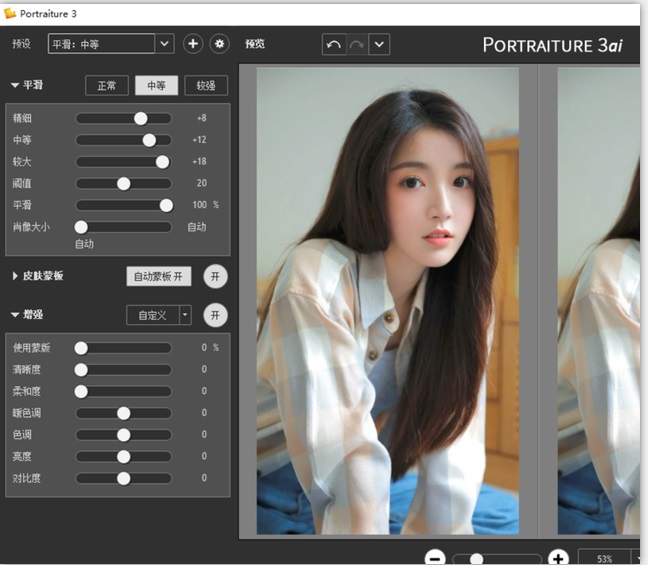
<p><a href="http://www.rjafx.com/?p=3356">PS磨皮插件 Portraiture 3 v3.5.7中文汉化版</a>是由<strong>兔八哥爱分享</strong>（<a href="http://www.rjafx.com/">www.rjafx.com</a>） 整理发布。<strong>imagenomic portraiture 3</strong>是一款Lightroom、Photoshop &amp; Aperture的人像磨皮插件。这是平滑皮肤的有效工具，同时保持纹理的现实结果-一个细线，所有肖像摄影师必须知道。该程序会自动检测受试者的皮肤，并创建一个面具，如果需要的话可以进行调整。有很多选项可以使用工具来调整色相、饱和度、亮度和纬度。一个单独的增强面板为一系列参数提供滑动条，包括锐度、色调、亮度和对比度，用于微调肖像的整体外观和感觉。如果你不确定你到底想要什么，这个程序有一个括号功能，所以你可以从相同的图像的几个变体中选择。有一些预设可以让你开始，但你可以创建和保存自己的笔记空间，所以你可以混合和匹配他们每次你拍摄肖像在相似的条件下。用于人像图片润色，磨皮等，减少了人工选择图像区域的重复劳动。它能智能地对图像中的皮肤材质、头发、眉毛、睫毛等部位进行平滑和减少疵点处理.包括人物肖像、全身,集体照,广告、时装、美容、医疗、运动图像,和不熟悉的约束或与其他软件产品相关的学习曲线,插件或数字修整技术。如果你已经开始玩摄影，Portraiture会是你必不可少的工具，它能让你处理照片事半功倍，同时也是很多影楼和工作室都必备这个插件！本站免费提供imagenomic portraiture 3破解版下载，同时提供该软件的破解补丁，更新内容请参考下文。</p>


<figure class="wp-block-image size-large"><img src="http://www.rjafx.com/wp-content/uploads/2022/01/ded2679f54abf16.jpg" alt="PS磨皮插件 Portraiture 3 v3.5.7" class="wp-image-3357" srcset="http://www.rjafx.com/wp-content/uploads/2022/01/ded2679f54abf16.jpg 648w, http://www.rjafx.com/wp-content/uploads/2022/01/ded2679f54abf16-300x262.jpg 300w" sizes="(max-width: 648px) 100vw, 648px" /><figcaption>PS磨皮插件 Portraiture 3 v3.5.7</figcaption></figure>


<h3>软件介绍</h3>


<p>　　极负盛名的专业人像磨皮滤镜，堪称磨皮神镜，仰望土豪器材党的屌丝团必备算法优秀，不会造成处理后的画面肉肉的失去了锐度，也不像柔光镜那样滥情特色是模拟包围曝光效果基于几十种可选参数调出可能合适的输出而实际上对于一般使用只要直接加载并应用默认预设效果就很好了！</p>


<h2>软件亮点</h2>


<p>　　1、Portraiture磨皮能保留下细小的毛孔，保留皮肤质感，这是其它很多磨皮柔肤软件所不具备的（多数软件磨皮后，面部皮肤就就像剥完皮的鸭蛋，失去皮肤质感）。</p>


<p>　　2、操作简便、软件很小才600kb，特别是它可以自动感应皮肤区域磨皮，只对皮肤作用，肤色之外的区域排除在外，所以它对头发，眼睛，睫毛几无影响。</p>


<p>　　3、此为混装版，支持32位与64位的 PS CS5，PS CS6，PS CC。</p>


<h2>PS磨皮插件 Portraiture 3 v3.5.7中文汉化版使用方法和下载地址</h2>


<p>链接: https://pan.baidu.com/s/1GpksNToAhzkPGotu10x2Bw?pwd=44q9 提取码: 44q9 </p>


<p>　　1、在photoshop里打开一张人像照片，使用“修复画笔工具（按J键）”把脸部大粒痘痘清除。</p>


<p>　　2、然后执行菜单：滤镜 》》 imagenomic 》》 Portraiture.。.进入磨皮工作界面，使用“吸管+”在皮肤区域点击取样2~3个点，其它参数基本上不用你设置（也可以微调“亮度”“冷暖度”）。</p>


<p>　　3、设置好参数，最后点击“确定”，照片磨皮柔肤就完成了！</p>


<p>PS磨皮插件 Portraiture 3.5.7(3571)中文汉化版X64支持PS2022</p>


<p>PS磨皮插件Portraiture 3 v3.5.7(3571) X64汉化版最新版<br>PS支持：CS6/CC/CC2014~CC2022+(仅支持64位)<br>软件语言：简体中文<br>系统支持：win7/win8/win10(仅支持64位)</p>
		</article>
		            <div class="post-actions">
            	<a href="javascript:;" etap="like" class="post-like action action-like" data-pid="3356"><i class="fa fa-thumbs-o-up"></i>赞(<span>19</span>)</a>            	<a href="javascript:;" class="action action-rewards" data-event="rewards"><i class="fa fa-jpy"></i> 打赏</a>            	            </div>
        		<div class="post-copyright">本软件仅供个人学习测试使用，请再下载后24小时内删除，不得用于商业用途，否则后果自负，请支持购买正版软件。<a href="http://www.rjafx.com">兔八哥爱分享-软件下载平台-绿色软件下载-破解软件免费下载</a> &raquo; <a href="http://www.rjafx.com/archives/3356">PS磨皮插件 Portraiture 3 v3.5.7中文汉化版X64支持PS2022</a></div>		
					<div class="action-share"><div class="bdsharebuttonbox">
<span>分享到：</span>
<a class="bds_qzone" data-cmd="qzone" title="分享到QQ空间"></a>
<a class="bds_tsina" data-cmd="tsina" title="分享到新浪微博"></a>
<a class="bds_weixin" data-cmd="weixin" title="分享到微信"></a>
<a class="bds_tqq" data-cmd="tqq" title="分享到腾讯微博"></a>
<a class="bds_sqq" data-cmd="sqq" title="分享到QQ好友"></a>
<a class="bds_bdhome" data-cmd="bdhome" title="分享到百度新首页"></a>
<a class="bds_tqf" data-cmd="tqf" title="分享到腾讯朋友"></a>
<a class="bds_youdao" data-cmd="youdao" title="分享到有道云笔记"></a>
<a class="bds_more" data-cmd="more">更多</a> <span>(</span><a class="bds_count" data-cmd="count" title="累计分享0次">0</a><span>)</span>
</div>
<script>
window._bd_share_config = {
    common: {
		"bdText"     : "",
		"bdMini"     : "2",
		"bdMiniList" : false,
		"bdPic"      : "",
		"bdStyle"    : "0",
		"bdSize"     : "24"
    },
    share: [{
        bdCustomStyle: "http://www.rjafx.com/wp-content/themes/dux-6.1-2/css/share.css"
    }]
}
with(document)0[(getElementsByTagName("head")[0]||body).appendChild(createElement("script")).src="http://bdimg.share.baidu.com/static/api/js/share.js?cdnversion="+~(-new Date()/36e5)];
</script></div>
		
		<div class="article-tags"></div>
		
				<div class="article-author">
			<img alt='' data-src='http://gravatar.wp-china-yes.net/avatar/c7c5a5655795bd7601a9030972e7110f?s=50&#038;r=g' srcset='http://gravatar.wp-china-yes.net/avatar/c7c5a5655795bd7601a9030972e7110f?s=100&#038;r=g 2x' class='avatar avatar-50 photo' height='50' width='50' />			<h4><i class="fa fa-user" aria-hidden="true"></i><a title="查看更多文章" href="http://www.rjafx.com/archives/author/zlsofthost">兔八哥爱分享</a></h4>
			关注微信公众号“兔八哥爱分享”或加群号4：535794950 快来一起学习吧！		</div>
		
		            <nav class="article-nav">
                <span class="article-nav-prev">上一篇<br><a href="http://www.rjafx.com/archives/3353" rel="prev">MAXON Cinema 4D C4D R25.117 破解版下载【Win+Mac】</a></span>
                <span class="article-nav-next">下一篇<br><a href="http://www.rjafx.com/archives/3359" rel="next">ps胶片滤镜模拟软件 Alien Skin Exposure X7 Win7.0.2 /X7 7.1.0.78 MacOS学习版</a></span>
            </nav>
        
		<div class="orbui orbui-post orbui-post-02"></div>		<div class="relates relates-thumb"><div class="title"><h3>相关推荐</h3></div><ul><error>
    <code>internal_server_error</code>
    <title><![CDATA[WordPress &amp;rsaquo; 错误]]></title>
    <message><![CDATA[&lt;p&gt;您的站点遇到了致命错误。&lt;/p&gt;&lt;p&gt;&lt;a href=&quot;https://wordpress.org/support/article/debugging-in-wordpress/&quot;&gt;了解更多在WordPress中调试的信息。&lt;/a&gt;&lt;/p&gt;]]></message>
    <data>
        <status>500</status>
    </data>
</error>